Resume Skills Section: What to Include and How to Write It (2026 Guide)
Learn what skills to put on your resume, how to organize your skills section, and which skills actually matter to employers. Includes examples by industry and tips for ATS optimization.
Your skills section can make or break your resume.
Done well, it’s a quick scan that tells recruiters exactly what you bring to the table. Done poorly, it’s a generic list that every other candidate also has.
With 65% of employers now using skills-based hiring, your skills section matters more than ever. Here’s how to write one that actually gets you interviews.
Why Your Skills Section Matters
Recruiters spend an average of 6-7 seconds on initial resume review. In that time, they’re looking for signals that you’re qualified.
Your skills section provides those signals instantly. It tells ATS systems which keywords to match. It tells recruiters whether to keep reading.
But here’s the catch: a skills section that lists “Microsoft Office, communication, teamwork” does nothing. It’s so generic it might as well not exist.
The goal is a skills section that’s specific, relevant, and proof of real capability.
Hard Skills vs. Soft Skills
Understanding the difference helps you balance your section correctly.
Hard Skills (Technical Skills)
These are specific, measurable abilities you’ve learned through training, education, or experience. They can be tested and verified.
Examples:
- Programming languages (Python, JavaScript, SQL)
- Software proficiency (Salesforce, Adobe Creative Suite, SAP)
- Technical certifications (PMP, CPA, AWS Certified)
- Industry-specific tools (medical equipment, manufacturing machinery)
- Languages (Spanish, Mandarin, Arabic)
- Data analysis (Excel, Tableau, R)
Characteristics:
- Concrete and verifiable
- Often industry-specific
- Acquired through formal learning
- Can be demonstrated through tests or portfolios
Soft Skills (Interpersonal Skills)
These are personal attributes that affect how you work and interact with others. They’re harder to measure but equally important.
Examples:
- Leadership
- Communication
- Problem-solving
- Time management
- Adaptability
- Teamwork
- Critical thinking
- Conflict resolution
Characteristics:
- Difficult to quantify
- Transferable across industries
- Developed through experience
- Demonstrated through behavior, not certificates
The Ideal Balance
Research suggests the ideal resume includes roughly 60% hard skills and 40% soft skills. But this varies by role.
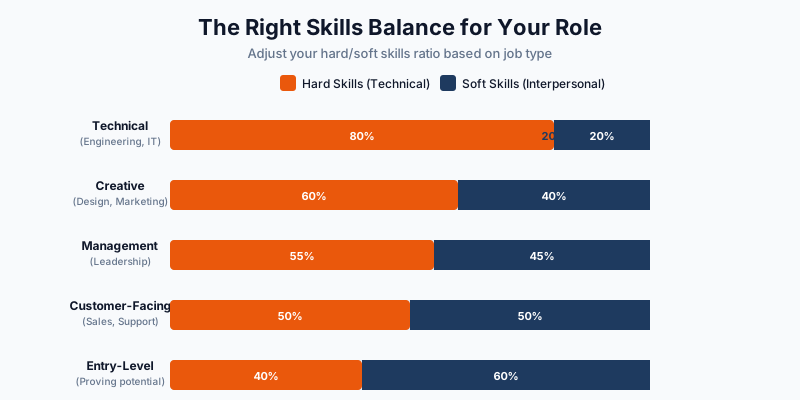
| Role Type | Skill Balance |
|---|---|
| Technical (engineering, IT, data) | 70-80% hard skills |
| Management | 50-60% hard skills |
| Creative | 60% hard skills, 40% soft skills |
| Customer-facing | 50% hard skills, 50% soft skills |
| Entry-level | More soft skills (you’re proving potential) |
What Skills Should You Include?
The answer depends entirely on the job you’re targeting. Here’s the process.
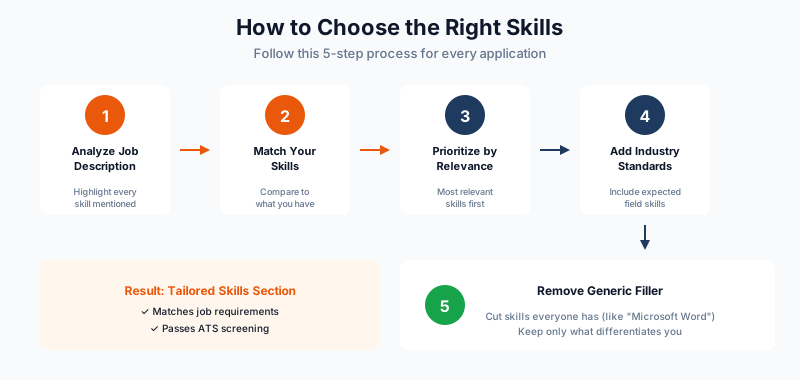
Step 1: Analyze the Job Description
Read the posting carefully. Highlight every skill mentioned. Note which appear in:
- Required qualifications (must include)
- Preferred qualifications (include if you have them)
- Responsibilities section (implies needed skills)
Step 2: Match Your Skills
Compare your abilities to what’s requested. Include skills you genuinely have that match the job requirements.
Step 3: Prioritize by Relevance
List your most relevant skills first. Recruiters scanning quickly will see these immediately.
Step 4: Add Industry Standards
Include common skills for your field even if not explicitly listed. For a marketing role, SEO and Google Analytics are assumed.
Step 5: Remove Generic Filler
If everyone has it, it doesn’t differentiate you. Cut “Microsoft Office” unless the job specifically requires advanced Excel or Access skills.
Skills Section Formats
How you organize your skills depends on your experience level and industry.
Format 1: Simple List (Best for Most)
SKILLS

Technical: Python, SQL, Tableau, AWS, Docker, Git
Marketing: Google Analytics, SEMrush, HubSpot, Mailchimp
Languages: English (Native), Spanish (Professional), French (Conversational)
Certifications: AWS Solutions Architect, Google Analytics Certified
Best for: Most professionals, ATS optimization, quick scanning.
Format 2: Categorized with Proficiency (Best for Technical Roles)
TECHNICAL SKILLS

Programming Languages
• Python (Advanced) • JavaScript (Advanced) • Java (Intermediate) • C++ (Basic)

Frameworks & Libraries
• React • Node.js • Django • TensorFlow

Cloud & DevOps
• AWS (EC2, S3, Lambda) • Docker • Kubernetes • CI/CD Pipelines

Databases
• PostgreSQL • MongoDB • Redis • MySQL
Best for: Technical roles where specific proficiency levels matter.
Format 3: Skills Matrix (Best for Consultants)
CORE COMPETENCIES

Strategic Planning      |  Financial Modeling     |  Team Leadership
Market Analysis         |  M&A Due Diligence      |  Client Relations
Business Development    |  Budget Management      |  Process Optimization
Best for: Consulting, management, or roles requiring broad competencies.
Format 4: Inline with Experience (Alternative Approach)
Instead of a separate section, weave skills into your experience bullets.
“Led data migration project using Python and SQL, reducing processing time by 40%”
Best for: Candidates who want to prove skills through context rather than lists.
Skills by Industry
Here are examples of relevant skills by field. Use these as starting points, then customize based on specific job postings.
Technology / Software
| Hard Skills | Soft Skills |
|---|---|
| Programming languages | Problem-solving |
| Cloud platforms (AWS, Azure, GCP) | Collaboration |
| Version control (Git) | Communication |
| Database management | Adaptability |
| CI/CD tools | Attention to detail |
| Agile/Scrum methodologies | Continuous learning |
Marketing
| Hard Skills | Soft Skills |
|---|---|
| Google Analytics | Creativity |
| SEO/SEM | Communication |
| Social media platforms | Project management |
| Email marketing tools | Adaptability |
| CRM systems | Analytical thinking |
| Content management systems | Collaboration |
Finance / Accounting
| Hard Skills | Soft Skills |
|---|---|
| Financial modeling | Attention to detail |
| Excel (advanced) | Analytical thinking |
| ERP systems (SAP, Oracle) | Integrity |
| GAAP/IFRS knowledge | Communication |
| Bloomberg Terminal | Time management |
| Tax software | Problem-solving |
Healthcare
| Hard Skills | Soft Skills |
|---|---|
| Electronic Health Records (EHR) | Empathy |
| Medical terminology | Communication |
| HIPAA compliance | Attention to detail |
| Clinical procedures | Stress management |
| Medical coding (ICD-10, CPT) | Teamwork |
| Laboratory equipment | Critical thinking |
Sales
| Hard Skills | Soft Skills |
|---|---|
| CRM systems (Salesforce, HubSpot) | Persuasion |
| Sales forecasting | Relationship building |
| Contract negotiation | Resilience |
| Pipeline management | Active listening |
| Presentation software | Time management |
| Market analysis | Adaptability |
The 2026 Skills Employers Actually Want
The job market has shifted. Here are skills that matter now.
AI and Automation Skills
Listing AI skills is no longer cutting-edge. It’s expected.
Include if relevant:
- AI tools (ChatGPT, Claude, Copilot)
- Prompt engineering
- AI-assisted workflows
- Automation platforms (Zapier, Make)
- Machine learning basics
Data Literacy
Even non-technical roles require data comfort.
Include:
- Data analysis
- Data visualization
- Spreadsheet proficiency (beyond basics)
- Dashboard creation
- Metrics interpretation
Remote Collaboration
Prove you can work effectively in distributed environments.
Include:
- Digital collaboration tools (Slack, Teams, Notion)
- Asynchronous communication
- Video conferencing platforms
- Project management software
- Remote team coordination
Common Skills Section Mistakes
Mistake #1: Listing Obvious Skills
“Microsoft Word” and “email” don’t need to be on your resume. Everyone has these.
Mistake #2: Including Skills You Can’t Back Up
If you list “Python” and get asked to write code in an interview, you’d better be able to do it. Don’t include skills you can’t demonstrate.
Mistake #3: Using Vague Terms
“Computer skills” and “good communicator” mean nothing. Be specific about which software you know and how you’ve applied communication skills.
Mistake #4: Ignoring the Job Description
A generic skills section that doesn’t match the job posting won’t pass ATS screening. Customize for every application.
Save time: ReviseCV’s Resume Tailor automatically extracts required skills from job postings and integrates them into your resume. No manual keyword hunting required.
Mistake #5: Only Listing Hard Skills
Soft skills matter, especially for roles involving leadership, client interaction, or teamwork. Include them with context.
Mistake #6: Keyword Stuffing
Cramming every possible keyword makes your resume unreadable. Include relevant skills naturally.
How to Demonstrate Soft Skills
Claiming soft skills without evidence is weak. Here’s how to prove them.
Don’t Just List. Show.
Instead of: “Strong communication skills”
Write in experience section: “Presented quarterly results to executive team of 12, leading to $500K budget approval for new initiative”
Use the STAR Method
For key soft skills, include at least one achievement that demonstrates them.
Leadership: “Led cross-functional team of 8 through product launch, delivering 2 weeks ahead of schedule”
Problem-solving: “Identified billing system error causing $50K monthly revenue loss, implemented fix within 72 hours”
Adaptability: “Transitioned entire department to remote operations in 5 days during COVID, maintaining 100% productivity”
ATS Optimization for Skills
Your skills section is prime territory for ATS keywords. Optimize it.
Use Exact Phrases from Job Postings
If the job asks for “customer relationship management,” don’t write “CRM.” Use both.
Include Variations
Different companies search different terms. Include reasonable variations:
- “Project Management” and “PM”
- “Search Engine Optimization” and “SEO”
- “Customer Relationship Management” and “CRM” and “Salesforce”
Don’t Hide Skills in Graphics
ATS can’t read images, charts, or graphics. Keep your skills in plain text.
Place Skills Strategically
A dedicated skills section near the top of your resume ensures ATS finds your keywords early.
Quick Check: Not sure if your skills section passes ATS? ReviseCV’s Resume Score shows exactly which keywords you’re hitting and which you’re missing for any job posting.
Sample Skills Sections
For a Software Engineer:
TECHNICAL SKILLS

Languages: Python, JavaScript, TypeScript, Go, SQL
Frameworks: React, Node.js, Django, FastAPI
Cloud: AWS (EC2, S3, Lambda, RDS), Docker, Kubernetes
Tools: Git, Jenkins, Terraform, Datadog
Methodologies: Agile/Scrum, CI/CD, Test-Driven Development
For a Marketing Manager:
SKILLS

Digital Marketing: SEO/SEM, Google Ads, Meta Ads, LinkedIn Ads
Analytics: Google Analytics 4, Tableau, Looker, A/B Testing
Marketing Tools: HubSpot, Mailchimp, Hootsuite, SEMrush
Content: WordPress, Canva, Adobe Creative Suite
Certifications: Google Analytics Certified, HubSpot Inbound Marketing
For a Project Manager:
CORE COMPETENCIES

Project Management: Agile, Scrum, Waterfall, Hybrid methodologies
Tools: Jira, Asana, Microsoft Project, Monday.com, Smartsheet
Certifications: PMP, Certified Scrum Master (CSM)
Technical: SQL (basic), Tableau, Advanced Excel
Leadership: Cross-functional team management, stakeholder communication
Key Takeaways
- Customize for every application. Generic skills sections don’t pass ATS or impress recruiters.
- Balance hard and soft skills. The ratio depends on your role and industry.
- Be specific. “Python” is useful. “Computer skills” is not.
- Only include what you can prove. If you can’t demonstrate it, don’t list it.
- Show soft skills through achievements. Don’t just claim them in a list.
- Optimize for ATS. Use exact phrases from job postings.
- Update regularly. Skills that mattered 2 years ago may be obsolete now.
Build Your Perfect Skills Section
The right skills section tells recruiters instantly that you’re qualified. It passes ATS filters. It earns you interviews.
Build your resume → with templates that include properly formatted skills sections, or check your skills match to see how your current resume aligns with your target role.
Need help identifying the right skills for a specific job posting? ReviseCV’s Resume Tailor automatically extracts required skills from any job description and integrates them into your resume.