Is Your Resume ATS-Friendly? The Complete Checklist
Use this checklist to verify your resume will pass Applicant Tracking Systems. Covers formatting, keywords, file types, and common ATS mistakes.
You’ve applied to dozens of jobs. Silence.
The problem might not be your qualifications. It might be that no human has ever seen your resume.
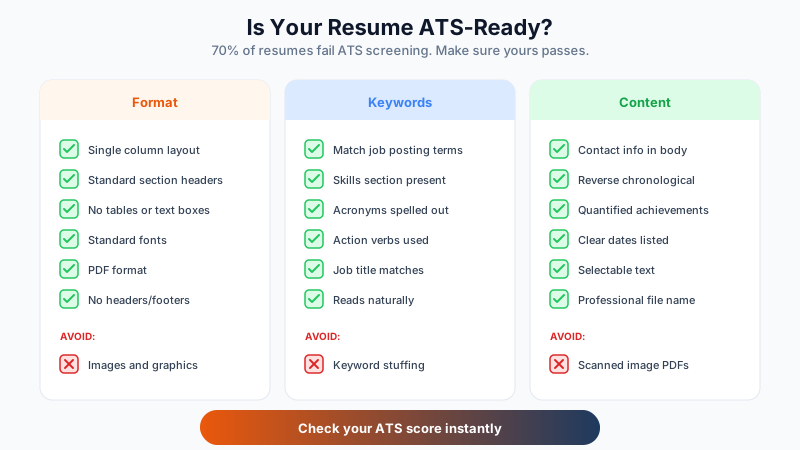
70% of resumes are filtered out by Applicant Tracking Systems (ATS) before reaching a recruiter. If your resume isn’t ATS-friendly, you’re invisible.
Use this checklist to fix that.
What Makes a Resume ATS-Friendly?
ATS software scans resumes for:
- Specific keywords from the job description
- Standard section headers it can recognize
- Clean formatting it can parse correctly
- Contact information it can extract
If the ATS can’t read your resume properly, you get rejected automatically.
The ATS-Friendly Resume Checklist
Format and Structure
- Single column layout (no multi-column designs)
- Standard section headers (Experience, Education, Skills)
- No tables or text boxes (ATS often can’t read these)
- No headers or footers (contact info gets lost)
- Simple bullet points (round bullets, not custom symbols)
- Standard fonts (Arial, Calibri, Georgia, Times New Roman)
- Font size 10-12pt for body text
- Adequate margins (0.5 to 1 inch)
File Type
- Saved as PDF (or .docx if specifically requested)
- Text is selectable (not a scanned image)
- Professional file name (FirstName_LastName_Resume.pdf)
Contact Information
- Name at the top (not in a header)
- Phone number in standard format (123-456-7890)
- Professional email address
- City and state/province (full address not required)
- LinkedIn URL (optional but recommended)
Keywords and Content
- Keywords from job posting included in resume
- Skills section present with relevant hard skills
- Job titles match or closely align with target role
- Acronyms spelled out at least once (PMP, Project Management Professional)
- No keyword stuffing (reads naturally)
Experience Section
- Reverse chronological order (most recent first)
- Company name, title, dates clearly listed
- Bullet points start with action verbs
- Quantified achievements where possible
What to Avoid
- No images, graphics, or logos
- No fancy fonts or icons
- No colored backgrounds
- No creative section names (“My Journey” instead of “Experience”)
- No special characters that might not parse correctly
Quick ATS Test
Can your resume pass this simple test?
Copy-paste test: Select all text and paste into Notepad. Does it come out in logical order? Can you read it?
Keyword match: Compare your resume to the job posting. Do at least 70% of the required skills appear in your resume?
Section recognition: Would a computer recognize your sections? Use standard headers like “Work Experience,” “Education,” “Skills.”
Common ATS Mistakes
| Mistake | Why It Fails | Fix |
|---|---|---|
| Two-column layout | ATS reads left-to-right across columns, scrambling content | Use single column |
| Creative section headers | ATS doesn’t recognize “Where I’ve Made Impact” | Use “Experience” |
| Graphics and icons | ATS can’t read images | Use plain text only |
| Fancy fonts | May not parse correctly | Stick to standard fonts |
| Info in headers/footers | Often ignored by ATS | Put contact info in body |
| Tables for layout | Text extraction fails | Use simple formatting |
ATS-Friendly Template Structure
[YOUR NAME]
Phone | Email | City, State | LinkedIn

PROFESSIONAL SUMMARY
[2-3 sentences with keywords]

SKILLS
[Relevant skills in simple list or comma-separated]

EXPERIENCE
[Job Title]
[Company Name] | [City, State] | [Start Date - End Date]
• Achievement with metrics
• Achievement with metrics
• Achievement with metrics

EDUCATION
[Degree], [Major]
[University Name], [Graduation Year]
Don’t Guess. Test.
Even ATS-friendly resumes can have hidden issues:
- Invisible characters from copy-pasting
- Fonts that don’t embed properly
- Keywords that don’t match the job
The fastest way to know if your resume is truly ATS-compatible is to test it.
Check your ATS score now: ReviseCV’s Resume Score analyzes your resume against real ATS systems and shows exactly what’s working and what needs fixing. Takes about 2 minutes.
After the ATS: Human Eyes
Remember: passing the ATS is just step one. Your resume still needs to impress the recruiter who reads it.
A truly optimized resume is:
- ATS-parseable (gets through the filter)
- Keyword-rich (matches the job)
- Achievement-focused (impresses the human)
This checklist handles the first two. Make sure your content delivers on the third.
Get your free ATS score and see exactly how your resume performs.